



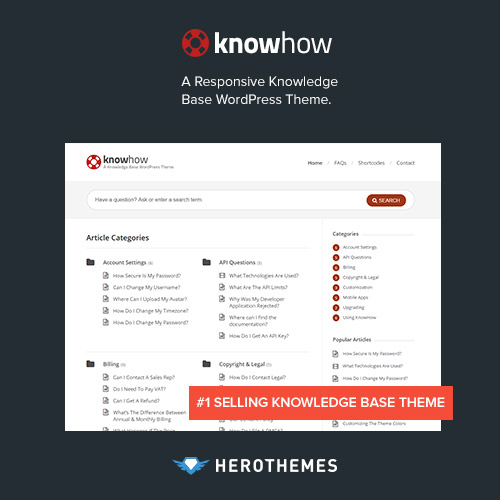
KnowHow – A Knowledge Base WordPress Theme
Build a Smart, Fast, and Organized Knowledge Base Website
KnowHow – A Knowledge Base WordPress Theme is a modern, responsive, and efficient theme designed to help businesses, organizations, and online platforms create self-service knowledge bases, help centers, and documentation websites with ease.
Perfect for support teams, SaaS companies, and product developers, KnowHow allows you to deliver instant answers to your customers, reduce support tickets, and improve overall user satisfaction. With a clean and intuitive layout, lightning-fast search, and effortless navigation, your users can find the help they need in seconds.
Whether you’re building a documentation hub, FAQ portal, or support resource center, KnowHow helps you organize and present information in a structured and visually appealing way — all powered by WordPress simplicity.
Key Features
1. Smart AJAX Live Search
KnowHow comes with an advanced AJAX-powered live search that delivers instant, real-time results as users type. Visitors can find relevant articles, FAQs, or guides instantly without waiting for page reloads, enhancing the browsing experience.
2. Intuitive Knowledge Base Layout
The theme features a well-structured knowledge base design that makes it easy to categorize and display your articles, tutorials, and documentation pages. Users can browse topics and subcategories seamlessly with clear hierarchies and navigation.
3. Fully Responsive and Mobile-Friendly
Designed with a mobile-first approach, KnowHow ensures your support and help center look perfect on every device — from desktops to tablets and smartphones — offering a consistent and optimized reading experience.
4. FAQ and Documentation Ready
Easily create detailed FAQ pages and documentation articles with built-in formatting options, shortcodes, and icons. Each article supports headings, code blocks, videos, and tables, helping you present information clearly and professionally.
5. Lightning-Fast Performance
KnowHow is built for speed and efficiency, ensuring fast loading times and smooth navigation. Optimized code and lightweight design guarantee minimal server load and a superior user experience.
6. SEO Optimized
The theme is SEO-ready, ensuring your knowledge base content ranks well on Google and other search engines. With clean code, schema markup, and optimized headings, your help articles are more likely to appear in rich search results.
7. Integrated Comment System
Encourage engagement and feedback by allowing users to comment on articles, share their experiences, or suggest improvements. This feature helps you improve your content and understand user needs.
8. Customizable Design with Live Preview
KnowHow provides flexible customization options via the WordPress Customizer, allowing you to change colors, typography, header layout, and more with real-time previews. You can match your branding without touching a single line of code.
9. Video & Media Support
Enhance your tutorials and documentation with embedded videos, images, and infographics. KnowHow fully supports YouTube, Vimeo, and self-hosted media files, making learning and support more engaging and effective.
10. Powerful Widgets and Shortcodes
The theme includes custom widgets and shortcodes for displaying categories, recent articles, popular topics, and related posts — helping you build a dynamic and interactive support center.
11. Ready-to-Use Homepage Layouts
KnowHow comes with professionally designed homepage layouts that showcase your most important help articles, categories, and announcements. Launch your knowledge base website quickly with one-click demo import.
12. Translation & Multilingual Support
Reach a global audience by translating your help center using WPML, Polylang, or Loco Translate. KnowHow is fully translation-ready and supports right-to-left (RTL) languages.
13. Regular Updates & Reliable Support
KnowHow is backed by consistent updates and dedicated customer support, ensuring your knowledge base website remains secure, modern, and fully functional.
Benefits of Using KnowHow WordPress Theme
-
Reduce customer support workload with a self-service portal
-
Enable users to find answers instantly via live search
-
Create organized, searchable knowledge base articles
-
Customize your help center design with ease
-
Improve SEO visibility for FAQs and documentation
-
Deliver responsive, mobile-friendly user experiences
-
Embed videos, images, and interactive content in guides
-
Get fast-loading pages and smooth navigation
-
Provide multilingual support for global customers
Why Choose KnowHow WordPress Theme?
KnowHow – A Knowledge Base WordPress Theme empowers you to build a professional and easy-to-navigate documentation or support website in minutes. Its smart live search, structured layout, and high performance help users get solutions instantly without needing to contact support.
Whether you’re managing a product documentation site, online training center, or technical help desk, KnowHow provides all the essential tools for efficiency, clarity, and performance. It’s lightweight, SEO-optimized, and highly customizable — a perfect choice for any business that values customer satisfaction and knowledge accessibility.
With KnowHow, you can focus on creating content that matters while the theme handles presentation, usability, and organization — giving your users a seamless self-service experience.








Christian G. –
Product was updated and worked right out of the box.
Mateo Y. –
Downloaded without errors.