



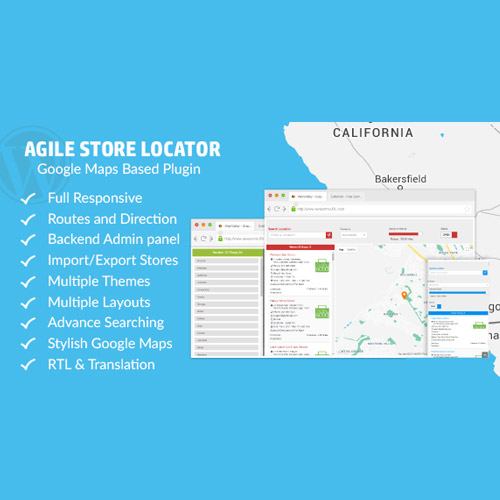
Store Locator (Google Maps) for WordPress Plugin
Description:
The Store Locator (Google Maps) for WordPress plugin is a powerful and highly customizable tool that allows you to display your physical business locations, dealer networks, or service centers directly on your WordPress website using the world’s most reliable mapping platform — Google Maps.
Designed for businesses with multiple locations, this plugin makes it easy for customers to find your nearest store or branch through an intuitive and responsive map interface. Whether you run a retail chain, a franchise network, or service outlets across multiple cities, the Store Locator plugin helps you manage, display, and organize all your locations from one centralized dashboard.
With its seamless integration with Google Maps API, advanced search filters, and clean layout options, this plugin provides a professional and user-friendly experience for both you and your visitors.
Key Features:
-
Google Maps Integration: Display your store or branch locations with live Google Maps, including zoom, drag, and street-view capabilities.
-
Advanced Location Search: Visitors can search by city, ZIP code, or use their current location to find the nearest store automatically.
-
Custom Map Markers and Categories: Create personalized map markers and categorize your stores by region, product type, or service category.
-
Responsive & Mobile-Friendly: Fully optimized for desktops, tablets, and smartphones, ensuring an excellent user experience on all devices.
-
Filter & Sorting Options: Users can filter locations based on specific categories or tags for quick and accurate results.
-
Detailed Store Information: Each location can include address, contact details, opening hours, website links, and directions.
-
Multiple Layouts: Choose from map-only, list-and-map, or grid layouts to best suit your site’s design.
-
Distance Calculation: Displays the distance between the visitor’s location and each store, enhancing usability and decision-making.
-
Customizable Map Styles: Match the map’s colors and appearance to your brand’s design using pre-built or custom Google Map styles.
-
Import & Export Locations: Manage large numbers of locations easily using CSV import/export functionality.
-
Clustering Support: Automatically groups nearby markers to keep the map clean and easy to navigate.
-
Translation & RTL Support: Compatible with WPML, Polylang, and multilingual sites.
How It Works:
The Store Locator (Google Maps) plugin is designed with simplicity and flexibility in mind. After installing it on your WordPress site, you can add new store locations directly through your dashboard, including key details such as address, phone number, email, and working hours. The plugin automatically geocodes addresses using Google Maps API and plots them precisely on your interactive map.
You can then insert the store locator anywhere on your website using a shortcode, Gutenberg block, or page builder widget. Users can search for stores near them, view directions, and filter results in real time.
Why Choose Store Locator (Google Maps) for WordPress?
When you have multiple store locations, making them easy to find is essential for attracting local customers. This plugin provides an elegant, efficient way to showcase all your branches or dealers in one interactive map.
Unlike static maps, it allows visitors to interact dynamically — zooming, filtering, or using geolocation to find the nearest branch instantly. Businesses in retail, logistics, healthcare, education, or hospitality can all benefit from this functionality.
The plugin is perfect for brands that value both aesthetics and performance. Its clean UI, combined with Google’s mapping reliability, ensures that your users have a seamless experience while exploring your locations.
Customization and Flexibility:
The Store Locator plugin offers extensive customization options to fit perfectly into your website’s design. You can choose from different map layouts, marker icons, and color schemes. You can even customize the info window that pops up when a user clicks on a location marker — showing store details, opening times, directions, and contact buttons.
For developers, the plugin offers hooks and filters to extend its functionality, making it suitable for complex or enterprise-level WordPress projects.
Performance and Compatibility:
Built with optimized JavaScript and API requests, the plugin ensures fast loading times even for websites with dozens or hundreds of store entries. It’s compatible with all modern browsers and integrates smoothly with page builders like Elementor, WPBakery, Divi, and Gutenberg.
The plugin is also compatible with caching and SEO plugins such as Yoast SEO and Rank Math, ensuring top performance without conflicts.
SEO and Business Benefits:
The Store Locator (Google Maps) plugin can help improve your website’s local SEO by associating each store or outlet with geographical coordinates, location data, and structured schema markup. When search engines can identify your locations, your business has a higher chance of appearing in local search results and Google Maps listings.
Additionally, by providing visitors with a smooth navigation experience and easy access to contact or direction information, you can increase foot traffic and customer satisfaction. This ultimately enhances both conversion rates and brand credibility.
Conclusion:
The Store Locator (Google Maps) for WordPress Plugin is the ultimate solution for businesses that need to display multiple physical locations in a professional, interactive, and SEO-friendly way. It combines powerful mapping features, intuitive design, and flexible customization options to deliver the best user experience possible.
Whether you’re managing retail chains, dealer networks, service outlets, or offices, this plugin helps customers find you faster and more efficiently. With real-time search, customizable markers, and responsive layouts, it’s an essential tool for modern businesses looking to improve customer engagement and visibility.










Eli I. –
Works exactly as shown in the demo.
Seth B. –
Everything runs perfectly.