



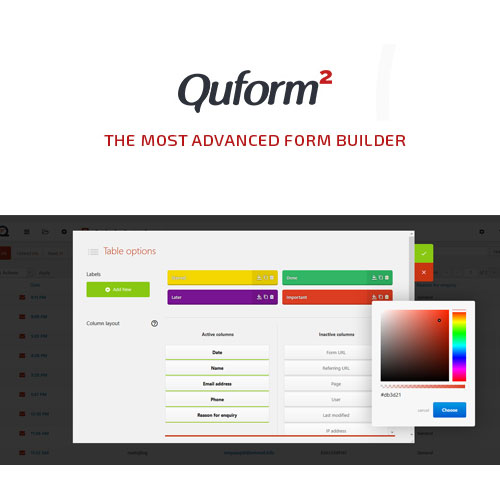
Quform – WordPress Form Builder
Create Advanced, Stylish, and Fully Customizable Forms with Ease
Quform – WordPress Form Builder is a powerful, flexible, and user-friendly form creation plugin that allows you to build professional forms for your website without writing a single line of code. Whether you need contact forms, application forms, surveys, quotation request forms, booking forms, registration forms, or support forms, Quform gives you all the tools necessary to design, customize, and manage any form type effortlessly.
Designed for businesses, agencies, freelancers, schools, service providers, and all WordPress users, Quform combines a drag-and-drop interface with advanced functionality to deliver polished, responsive, and feature-rich forms. It supports conditional logic, multi-page forms, file uploads, email routing, spam protection, and extensive styling options—making it one of the most complete form builder plugins in the WordPress ecosystem.
With Quform, you can create beautiful forms in minutes, collect submissions securely, organize entries within your dashboard, and improve communication across your entire website.
Key Features
1. Intuitive Drag-and-Drop Form Builder
Quform’s visual builder lets you easily add, move, rearrange, and customize fields. Its intuitive interface ensures that even beginners can create complex forms without any technical knowledge.
2. 19+ Form Fields & Unlimited Elements
Create powerful forms using text fields, dropdowns, radio buttons, checkboxes, date pickers, file upload fields, multi-select options, paragraph boxes, password fields, and more. You can mix and match elements to fit any form type.
3. Conditional Logic for Smart Forms
Show or hide fields, sections, or entire pages based on user input. This allows you to build intelligent, dynamic forms that adapt to the user’s selections—ideal for surveys, booking forms, and advanced applications.
4. Multi-Page Forms with Progress Indicators
Break long forms into multiple steps for better user experience. Quform includes customizable progress bars, step indicators, and buttons to guide users smoothly through each page.
5. File Upload Support
Let users upload images, documents, PDFs, or other files directly through your forms. You can limit file size, restrict formats, and set multiple upload rules for secure submissions.
6. Email Notifications & Auto-Responses
Automatically notify administrators when a form is submitted. You can also send custom confirmation emails to users, attach files, and route notifications based on conditional logic.
7. Built-In Anti-Spam Protection
Quform includes multiple spam-prevention methods such as reCAPTCHA, honeypots, and invisible CAPTCHA. These tools keep your inbox clean and protect form entries from bots.
8. Advanced Form Styling Options
Customize every detail—colors, fonts, spacing, borders, button styles, icons, and field layouts. With its theme customization system, you can match forms perfectly with your website’s branding.
9. Fully Responsive Design
All forms created with Quform are mobile-friendly and adapt automatically to smartphones, tablets, and desktops, ensuring a smooth user experience across every device.
10. Editable Entries & Submission Management
View, filter, organize, and export submissions directly from your WordPress dashboard. You can search entries, download them, or integrate with external tools using custom workflows.
11. Pre-Built Form Templates
Start building instantly with ready-made form templates for contact forms, event registrations, quote requests, and more. You can customize any template to match your specific needs.
12. Import & Export Forms
Easily transfer forms between websites or back them up for security. The import/export functionality ensures your work remains safe and reusable.
13. Multi-Language & Translation Ready
Compatible with WPML, Polylang, and Loco Translate, Quform supports multilingual websites and international audiences.
14. Smooth Integrations & Developer Friendly
Quform integrates seamlessly with WordPress themes, page builders, and plugins. Developers can extend functionality using hooks, filters, and custom styling rules.
Benefits of Using Quform
-
Build any type of form without coding
-
Create smart, dynamic forms with conditional logic
-
Improve user engagement with multi-step forms
-
Receive submissions instantly via email notifications
-
Keep your site secure with built-in spam protection
-
Collect and manage entries directly within WordPress
-
Customize forms to match your brand perfectly
-
Enhance user experience on all devices
-
Speed up workflow using pre-built templates
-
Increase conversions with professional and intuitive forms
Why Choose Quform – WordPress Form Builder?
Quform stands out as one of the most powerful and user-friendly form builders for WordPress, offering a perfect balance of simplicity and advanced functionality. Whether you’re running a business website, service platform, school portal, membership site, or eCommerce store, Quform gives you the freedom to create any form you can imagine—beautifully, efficiently, and reliably.
With its drag-and-drop builder, dynamic fields, customizable layouts, and comprehensive submission management, Quform delivers a seamless form building experience that saves time, improves communication, and enhances user interaction across your website. If you’re looking for a flexible, professional, and performance-optimized form solution, Quform is a top choice for both beginners and advanced users.








Eric A. –
Highly recommend this!
Nico U. –
Everything’s updated.