



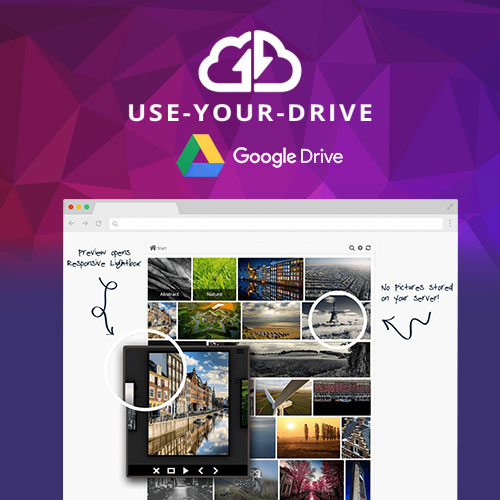
Use-your-Drive | Google Drive Plugin for WordPress
Turn Your WordPress Website into a Powerful Google Drive Integration Platform
Use-your-Drive | Google Drive Plugin for WordPress is a complete, professional, and intuitive cloud integration solution that allows you to seamlessly connect your Google Drive account directly to your WordPress website. Whether you want to display documents, stream videos, create file libraries, receive user uploads, manage digital resources, or build private client portals, this plugin gives you full control over your Drive content without leaving WordPress.
Designed for businesses, educators, agencies, digital creators, membership sites, and corporate teams, Use-your-Drive ensures that your files remain organized, secure, and easily accessible. It eliminates the need for manual uploads or server-heavy storage, enabling you to use the power of Google’s cloud infrastructure while maintaining a streamlined user experience on your website.
With real-time syncing, advanced folder controls, private file areas, built-in media players, and drag-and-drop functionality, the plugin transforms your WordPress site into a fully functional, cloud-enabled file management system.
Key Features
1. Seamless Google Drive Integration
Use-your-Drive connects your WordPress site directly to Google Drive, allowing you to browse, display, embed, and manage files with a clean and intuitive interface. Any changes you make on Google Drive automatically reflect on your website in real time.
2. Advanced File Browser & Front-End Manager
The plugin includes a full file browser with support for previews, downloads, uploads, renaming, moving, and deleting files — all from the front end. This makes it ideal for client portals, student dashboards, internal company systems, or collaborative projects.
3. Built-in Document Viewer
Display PDFs, Word files, spreadsheets, presentations, and more using Google’s native viewer. Users can preview documents instantly without downloading them, offering a smooth and professional experience.
4. Customizable File Galleries & Media Libraries
Create attractive galleries for images, videos, or mixed media. The plugin includes grid layouts, list layouts, folder navigation, and customizable gallery styles that fit seamlessly into any design or theme.
5. Private Folders for Individual Users
Automatically generate private, secure folders for logged-in users. Members, clients, employees, and students can access their own files and upload documents within their assigned directories.
6. Front-End Upload Forms
Collect files directly from your users with elegant upload forms. Submissions go straight to your Drive, making it perfect for applications, assignments, customer documents, project files, and more.
7. Built-In Audio & Video Players
Stream video and audio files directly from Google Drive through integrated media players, eliminating the need for hosting large files on your server.
8. Real-Time Syncing & Automated File Updates
Any changes made in Google Drive — renaming, moving, deleting, or adding files — are instantly synced with your website, ensuring your content is always up to date.
9. Advanced Search & Filtering
Users can search by keyword, file type, name, or extension. This is especially useful for large file libraries, resource archives, and documentation hubs.
10. Secure Access & Permission Controls
Restrict content by user roles, password-protect folders, hide directories, or limit access to specific members. The plugin relies on Google API authentication for maximum security.
11. Shortcodes, Widgets & Page Builder Support
Easily embed files, folders, galleries, or upload boxes anywhere using shortcodes or widgets. The plugin integrates smoothly with Elementor, WPBakery, Gutenberg, Divi, and other major builders.
12. Responsive & Mobile Optimized
All file browsers, galleries, viewers, and upload forms are fully responsive. Users can access and interact with files on any device — phone, tablet, or desktop.
13. Translation Ready & Multi-Language Support
Compatible with WPML, Polylang, and Loco Translate, Use-your-Drive is suitable for global websites serving users in multiple languages.
14. Performance Optimized
With lightweight code and cloud-based file delivery, your site loads faster and performs better, even when handling large file libraries or media-heavy content.
Benefits of Using Use-your-Drive
-
Manage all Google Drive files directly from WordPress
-
Reduce server storage by hosting files on the cloud
-
Offer private file areas for clients, students, or employees
-
Stream video, preview documents, and create resource libraries
-
Improve workflow with real-time syncing and automated updates
-
Simplify collaboration with user uploads and file sharing
-
Strengthen security with controlled access and role-based permissions
-
Enhance professionalism through organized, searchable file systems
-
Deliver a seamless user experience on all devices
Why Choose Use-your-Drive | Google Drive Plugin for WordPress?
Use-your-Drive is one of the most powerful, reliable, and user-friendly Google Drive integration plugins available for WordPress. It gives businesses, institutions, and creators complete control over cloud-based file delivery while keeping everything centralized within WordPress. Whether you’re building a private file portal, a digital resource library, an e-learning platform, a customer dashboard, or a media-rich website, this plugin offers all the tools you need to manage files efficiently and professionally.
With flexible embedding options, advanced permissions, beautiful galleries, secure user access, and seamless Drive syncing, Use-your-Drive ensures your WordPress site remains fast, organized, and cloud-powered. If you want a polished and efficient document management solution that saves server space, boosts productivity, and enhances user experience, this plugin is an exceptional choice.







Brody W. –
Really good quality.
Maddox O. –
Fast response and delivery.